
Dynamic Evaluate Component
The Dynamic Evaluate component evaluates an expression to select a DataWeave script, and then executes the new script to generate a result. This behavior enables you to dynamically select the script, instead of hardcoding it into the Transform Message component.
The script can use any of the usual context variables, such as message, payload,vars, or attributes, but you can also add custom ones by providing a set of key-value pairs.
Dynamic Evaluate Configuration
| Field | Value | Description | Example |
|---|---|---|---|
Expression |
DataWeave expression |
Specifies an expression that selects a DataWeave script that Mule then executes. |
|
Parameters |
DataWeave expression |
Specifies key-value pairs to set as parameters that the DataWeave script can evaluate. |
|
Compiled Script Caching
Mule compiles each script that the Dynamic Evaluate component runs, and then stores the compiled script in the DataWeave compiled scripts cache. When the component runs the same script again, Mule reuses the cached script instead of compiling it again. Mule identifies each cached script by its full text, so any change to the text, even a single character, creates a new script that Mule must compile and cache.
Because the Dynamic Evaluate component selects or builds a script for each event, different events can produce different scripts. Limit the number of script variations to what your use case requires, for example, one script per locale or message type.
Don’t build the script text from values that change on each event, such as payload fields, query parameters, or order IDs. If each event produces a different script:
-
Mule compiles a new script for every event, which adds processing time.
-
The cache fills with scripts that Mule never reuses, and memory usage grows until the cache reaches its size limit.
-
Mule evicts other cached scripts, which then must be compiled again.
Instead, pass the values that change on each event in the Parameters field, or reference them in the script through payload, vars, or attributes.
This example embeds the order ID in the script text, so Mule compiles and caches a new script for each order:
<!-- Avoid: the script text changes for each order -->
<set-variable variableName="orderScript"
  value='#["output application/json --- { message: \"Order " ++ payload.orderId ++ " received\" }"]'/>
<ee:dynamic-evaluate expression="#[vars.orderScript]"/>
This example passes the order ID as a parameter instead, so the script text is the same for every order and Mule compiles it only once:
<set-variable variableName="orderScript"
  value='output application/json --- { message: "Order " ++ orderId ++ " received" }'/>
<ee:dynamic-evaluate expression="#[vars.orderScript]">
  <ee:parameters>#[{orderId: payload.orderId}]</ee:parameters>
</ee:dynamic-evaluate>
To set the maximum number of compiled scripts in the cache, use the mule.weave.script.parser.cache.size system property. For more information, see DataWeave Memory Management.
Evaluate DataWeave Script from the File System Example
The following example shows how the Dynamic Evaluate component selects and executes a DataWeave script stored locally in the file system. The application’s flow behavior is as follows:
-
An HTTP Listener source listens to a POST URL request that contains a
localequery parameter and a payload. -
A File Read operation uses the
localequery parameter received in the HTTP request to search locally the DataWeave script that matches the parameter name. -
The File Read operation stores the content of the script into a new variable.
-
A Dynamic Evaluate component executes the DataWeave expression stored in the variable.
-
A Logger component logs the payload result of the transformation.
The locally stored DataWeave scripts can be stored in a database instead of locally, and the app can be modified to pick the files from the database instead of the file system. This enables you to replace any of the .dwl files while the app is deployed and running, changing the DataWeave script to execute without having to modify or redeploy the application.
In this example, you create two DataWeave scripts and store them locally, create the Mule application, and run and test the application:
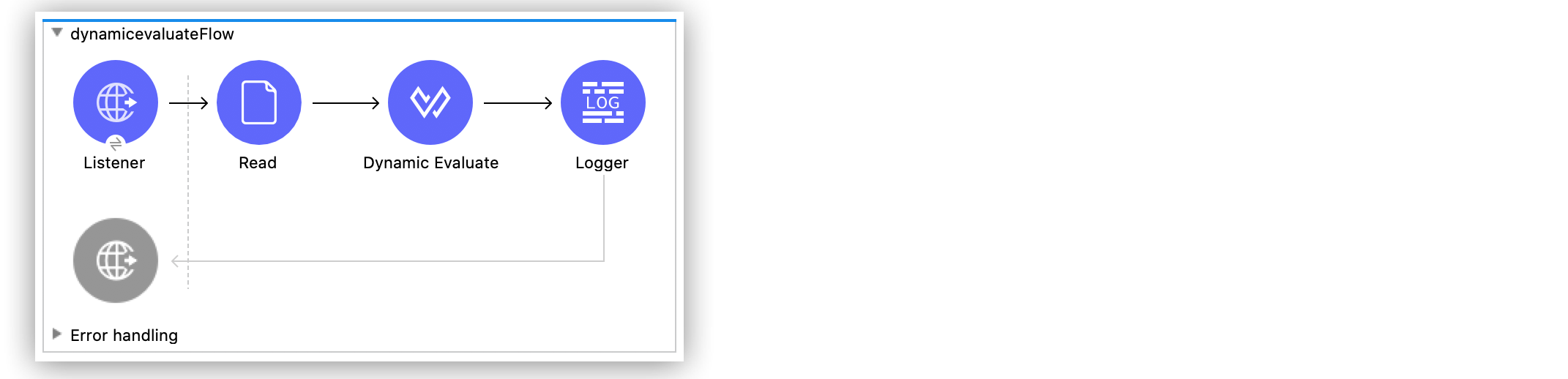
Create and Store the DataWeave Scripts
The first step in evaluating DataWeave scripts from the file system is to create and locally store the scripts:
-
Create a new Mule project in Studio.
-
In the Package Explorer window, under the name of your Mule project, right-click the src/main/resources folder and select New > File.
-
In the File name field, add the name
dw_en-US.dwlto create the new DataWeave script file. -
Click Finish.
-
In the dw_en-US.dwl window, paste the following DataWeave expression:
%dw 2.0 output application/json --- { "First Name": payload.name, "Last Name": payload.last, "Country": payload.loc } -
Repeat the previous steps and create a new file named
dw_es-AR.dwlthat contains the following DataWeave expression:%dw 2.0 output application/json --- { "Nombre": payload.name, "Apellido": payload.last, "País": payload.loc } -
Save your changes.
Create the Mule Application
After creating and locally saving your example scripts, create the Mule application in Studio:
-
In the Package Explorer window src/main/mule (Flows) folder, navigate to your flow’s
.xmlfile. -
In the Mule Palette view, select the HTTP Listener source and drag it onto the canvas.
The source initiates the flow by listening for incoming HTTP requests. -
Set the Path field to
/test. -
Click the plus sign (+) next to the Connector configuration field to configure a global element that can be used by all instances of the HTTP Listener in the app.
-
On the General tab, configure the following fields:
-
Host:
All Interfaces [0.0.0.0] (default) -
Port:
8081
-
-
Click OK.
-
Drag the File Read operation to the right of HTTP Listener.
-
Click the plus sign (+) next to the Connector configuration field to configure a global element that can be used by all instances of the File Read operation in the app.
-
On the General tab, set the Working Directory field to the main resources folder that contains your Studio project and previous DataWeave scripts:
/Users/username/AnypointStudio/studio-workspace/dynamicevaluate/src/main/resources -
Click OK.
-
In the File path field, set the path
#["dw_" ++ attributes.queryParams.locale ++ ".dwl"].The connector reads the locally stored DataWeave script file names that start with
dw_and contains thelocalequery parameter (attributes.queryParams.locale) received in the HTTP request. -
In the Advanced tab, set the Target Variable field to
dwScript.
This variable stores the DataWeave script that matched the file search. -
Drag the Dynamic Evaluate component to the right of File Read.
-
Set the Expression field to
#[vars."dwScript"]to execute the matched DataWeave script saved in the variabledwScript. -
Set the Target value field to
payload. -
Drag a Logger component to the right of Dynamic Evaluate.
-
Set the Message field to
#[payload]. -
Save your Mule application.
Run and Test the Mule Application
After you create your Mule application, run and test it:
-
Click the project name in Package Explorer and then click Run > Run As > Mule Application.
-
Send a POST request to
http://localhost:8081/test, appending to the URL any of the following query parameterslocale=en-USorlocale=es-AR, for example:
http://localhost:8081/test?locale=en-USAdditionally in the POST request, send the following payload:
{ "name": "Max", "last": "The Mule", "loc": "Argentina" } -
In the Studio Console, scroll through the logs to see the result message:
INFO  2021-01-19 11:18:25,559 [[MuleRuntime].uber.12: [dynamicevaluate].dynamicevaluateFlow.CPU_INTENSIVE @2588f400] [processor: dynamicevaluateFlow/processors/2; event: 319aacc0-5a61-11eb-bbb8-f01898ad2638] org.mule.runtime.core.internal.processor.LoggerMessageProcessor: {
  "First Name": "Max",
  "Last Name": "The Mule",
  "Country": "Argentina"
}
XML for Evaluating DataWeave Script from a File System
Paste this code into your Studio XML editor to quickly load the flow for this example into your Mule app:
<?xml version="1.0" encoding="UTF-8"?>

<mule xmlns:ee="http://www.mulesoft.org/schema/mule/ee/core" xmlns:file="http://www.mulesoft.org/schema/mule/file"
	xmlns:http="http://www.mulesoft.org/schema/mule/http"
	xmlns="http://www.mulesoft.org/schema/mule/core" xmlns:doc="http://www.mulesoft.org/schema/mule/documentation" xmlns:xsi="http://www.w3.org/2001/XMLSchema-instance" xsi:schemaLocation="http://www.mulesoft.org/schema/mule/core http://www.mulesoft.org/schema/mule/core/current/mule.xsd
http://www.mulesoft.org/schema/mule/http http://www.mulesoft.org/schema/mule/http/current/mule-http.xsd
http://www.mulesoft.org/schema/mule/file http://www.mulesoft.org/schema/mule/file/current/mule-file.xsd
http://www.mulesoft.org/schema/mule/ee/core http://www.mulesoft.org/schema/mule/ee/core/current/mule-ee.xsd">
	<http:listener-config name="HTTP_Listener_config" doc:name="HTTP Listener config" >
		<http:listener-connection host="0.0.0.0" port="8081" />
	</http:listener-config>
	<file:config name="File_Config" doc:name="File Config" >
		<file:connection workingDir="/Users/ktroller/AnypointStudio/studio-workspace/dynamicevaluate/src/main/resources" />
	</file:config>
	<flow name="dynamicevaluateFlow" >
		<http:listener doc:name="Listener" config-ref="HTTP_Listener_config" path="/test"/>
		<file:read doc:name="Read" config-ref="File_Config" path='#["dw_" ++ attributes.queryParams.locale ++ ".dwl"]' target="dwScript"/>
		<ee:dynamic-evaluate doc:name="Dynamic Evaluate" expression='#[vars."dwScript"]'/>
		<logger level="INFO" doc:name="Logger" message="#[payload]"/>
	</flow>
</mule>
Evaluate DataWeave Script from a Database Example
The following example selects a script from a database through a userId query parameter and stores that script in a userScript variable. The dynamic-evaluate component accesses the userScript variable to invoke the script using the provided parameter name, which contains the value of attributes.queryParams.userName.
<flow name="dynamic-evaluate-example-flow">
  <http:listener config-ref="HTTP_Listener_Configuration" path="/"/>
  <!-- This SQL query uses queryParams.userId to dynamically select a DataWeave script stored in a Database,
  and then assign this script to target variable userScript-->
  <db:select config-ref="dbConfig" target="userScript">
    <db:sql>#["SELECT script FROM SCRIPTS WHERE ID = $(attributes.queryParams.userId)"]</db:sql>
  </db:select>
  <!-- The dynamic evaluate component executes the script stored in vars.userScript-->
  <ee:dynamic-evaluate expression="#[vars.userScript]">
    <!-- This line sets a parameter called 'name', so the expression in the Dynamic Evaluate component can use it -->
    <ee:parameters>#[{name: attributes.queryParams.userName}]</ee:parameters>
  </ee:dynamic-evaluate>
</flow>
Consider the following scripts stored in this example’s database for entries lsalander and
mblomkvist, respectively:
output application/json
---
{
  message: "Order " ++ attributes.queryParams.orderId ++ " has been received from " ++ name,
  items: payload.items
}
output application/x-www-form-urlencoded
---
{
  message: "Order " ++ attributes.queryParams.orderId ++ " has been received from " ++ name,
  items: payload.items
}
Example Application Behavior
When this example Mule application receives lsalander as the queryParams.userId in the request, Mule executes the corresponding script, which results in a JSON response. If the application receives mblomkvist as the queryParams.userId value, Mule executes a different script that generates a x-www-form-urlencoded response.
This example demonstrates how the response type can be parameterized based on the user, but the entire response can be parameterized to suit each users needs.